
People who love pixel art are easy to spot and surprisingly hard to buy for. They already have the game, the poster and the T-shirt. What they usually enjoy more is something that lets them make pixel art, or something that shows it glowing in a room.
So this list is sorted by budget, and inside each budget I've mixed things to make with things to display. For each idea: what it is, who it suits, and what it costs.
One thing first, so you know where I stand. My name is Álvaro and I build Frame, a 64x64 LED pixel frame that shows up near the end of this list. I've spent a lot of time staring at pixels for it, which is why I wanted to write this guide, and also why I'm biased. Every price of other brands comes from the maker's own website or a big retailer, checked in November 2026. It's Black Friday season and prices are moving every day, so check again before you buy.
The short answer
- Under $25: a fuse bead kit (Perler or Hama), a pixel art book, Aseprite or PICO-8.
- $25 to $100: a pixel mosaic kit, a small LED pixel display like the Divoom Pixoo Max, or the parts for a DIY 64x64 LED matrix.
- Over $100: the Divoom Pixoo 64, the reference 64x64 pixel display.
- Something different: Frame, a 64x64 pixel frame that lights up with photos sent by the people you love. It isn't on sale yet.
- No budget at all: turn a photo of the two of you into 64x64 pixel art and give it to them.
Quick comparison
| Gift | Type | Approximate price (November 2026) | Best for |
|---|---|---|---|
| Perler or Hama fuse beads | Craft | About $18 (Perler kit), about 21 € (Hama Midi gift box) | Hands on fun, kids and adults |
| Make Your Own Pixel Art (book) | Learning | About $20 | Beginners |
| Aseprite | Software | About $20 on Steam | Anyone who wants to draw and animate sprites |
| PICO-8 | Software | About $15 | People who'd love to make a tiny game |
| Pixelhobby mosaic kit | Craft | From about 45 € | Patient makers who like a finished piece to hang |
| Divoom Pixoo Max | LED display | About $100 | Pixel art on a desk, on a budget |
| DIY 64x64 LED matrix (Adafruit parts) | Maker project | About $75 plus a power supply | People who like to build and code |
| Divoom Pixoo 64 | LED display | About $150 | The best known 64x64 pixel art display |
| Frame | LED frame | 75 € ($85) with a 1 € reservation | Seeing photos from your people as pixel art |
| A pixel portrait you make yourself | Homemade | Free | Anyone |
Under $25
Fuse beads: Perler and Hama
Fuse beads are pixel art you can hold. You place small plastic beads on a pegboard, one bead per pixel, and then iron them so they melt together into a single piece. Any sprite from an old game works as a pattern, because a sprite is already a grid.
- Perler is the best known brand in the US. Its activity kits are listed at about $18 on Perler's own store (the Sonic the Hedgehog kit, for example), and its Deluxe Boxes at about $29. Some were out of stock when I checked, so look at what's available.
- Hama is the European classic, from Denmark. Its Midi gift boxes, with beads and pegboards, were around 21 € at big European retailers like Galaxus.
The beads are small, so the brands list age ranges on each box. For adults, a big bucket of beads in many colours is often a better gift than a themed kit, because they'll want to make their own designs.
Best for: someone who likes making things with their hands, and families who want an evening project together.
A pixel art book
If they want to get better at drawing pixel art, a book is a lovely, low key gift.
- Make Your Own Pixel Art by Jennifer Dawe and Matthew Humphries, from No Starch Press, is 200 pages that go from the basics to shading, colour and animation. It's $19.95 for the print book (which includes the ebook) on the publisher's site.
- Pixel Logic by Michael Azzi is a long, well known pixel art tutorial book. It's a digital PDF of more than 200 pages that the author sells himself on Gumroad, so it's a gift you send by email rather than wrap.
Best for: beginners, or anyone who keeps saying they'd like to draw more.
Aseprite
Aseprite is one of the most popular programs for pixel art, with 98% positive reviews out of more than 12,000 on Steam. It's made for drawing and animating sprites: layers, frames, onion skinning, palettes and export to GIF and PNG. On Steam it's $19.99 in the US (20.49 € in Europe) and it runs on Windows, Mac and Linux. Steam lets you buy it as a gift, which makes it easy to give.
Best for: anyone who already draws pixel art in a free tool and is ready for a proper one.
PICO-8
PICO-8 is a "fantasy console": a tiny pretend game machine that runs on your computer, with a 128x128 screen and a palette of 16 colours. Inside it you draw the sprites, write the code, compose the music and play the result. The limits are the fun. It's $14.99 on Lexaloffle's site, for Windows, Mac, Linux and Raspberry Pi.
Best for: pixel art lovers who've always wanted to make a small game of their own.
$25 to $100
Pixel mosaic kits
A step up from fuse beads, and with no iron involved. Pixelhobby is a Dutch brand where you press small plastic pixels onto baseplates, and they clip in place without glue. It comes in two sizes, Pixel (2.5 mm) and Pixel XL (5 mm). On Pixelhobby's own shop, the kit with 4 baseplates is 44.75 € and the one with 12 baseplates is 111.25 €. In the US you'll find Pixelhobby kits at craft retailers, at prices that vary a lot by size.
Diamond painting kits work in a similar way, with tiny resin "drills" stuck on a canvas, and some are made from pixel art designs. There are many brands and quality varies, so read the reviews before you pick one.
Best for: patient people who like ending up with a piece to frame and hang.
A small LED pixel display: Divoom Pixoo Max
Divoom makes the best known pixel art displays. The Pixoo Max has a 32x32 grid and was listed at $99.99 on Divoom's US store, down from $129.99. You draw on it or load pixel art from the Divoom app and its community gallery. Fewer pixels than the Pixoo 64 means simpler art, which honestly suits a lot of classic pixel art fine.
Best for: someone who wants their pixel art glowing on a desk without spending $150.
A DIY 64x64 LED matrix
For makers, the best gift might be the parts. A 64x64 RGB LED panel with a HUB75 connector and an ESP32 board is all the hardware you need for your own pixel display. Adafruit sells a 64x64 panel with 2 mm pitch at $54.95 and the Matrix Portal S3, an ESP32-S3 board that plugs straight into the panel, at $19.95. Add a 5V power supply and you're at roughly $75 plus the supply. Both were out of stock on Adafruit's store when I checked, so look for a restock or a reseller. You can also find cheaper generic panels, but Adafruit says its own are the ones it guarantees work with the board.
On the software side, the ESP32 HUB75 MatrixPanel DMA library is what most people use with ESP32 boards and 64x64 panels. I know this path well, because Frame is exactly this, an ESP32 driving a 64x64 panel, taken all the way to a product. If they'll want to film their creation, my guide to why HUB75 panels flicker on camera will save them a headache.
Best for: people who want the project as much as the result.
Over $100
Divoom Pixoo 64
The Pixoo 64 is the reference pixel art display: a 64x64 LED grid, about 10 inches across, controlled from the free Divoom app, with a huge community gallery to browse. The model Divoom sells now is the Pixoo 64 II, listed at $149.99 on Divoom's US store, and the page was showing a Black Friday discount code when I checked.
If the person you're buying for loves pixel art and wants it glowing on a shelf this Christmas, this is the safest gift on the list. I mean that, even though I build something in the same space. If you want to see what else is out there, I compared it with the alternatives in my Pixoo 64 alternatives guide, and I also wrote about Tidbyt alternatives for people who'd rather have a pixel display that shows information.
Best for: pixel art decor, gaming rooms and creators.
Something different: Frame
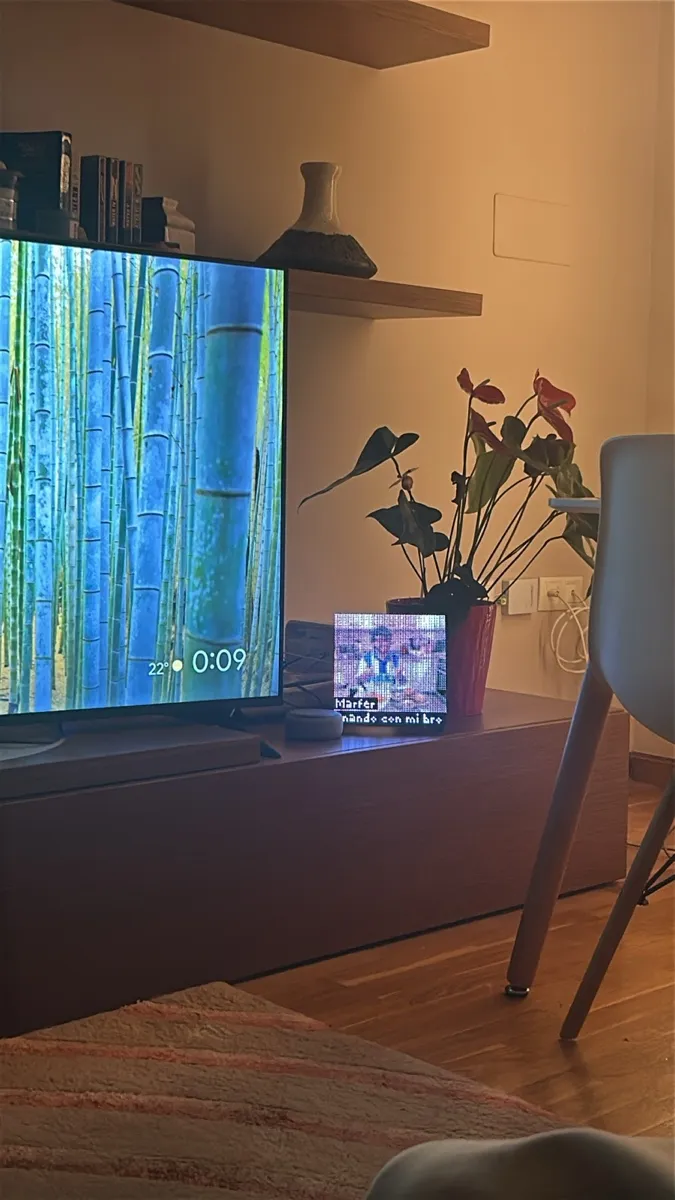
Frame has the same 64x64 LED grid as the Pixoo 64, but it's made for something else. You put it in your home, and the people you love open the free Frame app (iPhone and Android), take or choose a photo, and it shows up on your Frame as pixel art, wherever they are. They can also send drawings and short videos. There's no subscription.
I built it because my job took me to Valencia, almost 1,000 km from my parents, my brother and my friends, and I wanted to feel them close without having to pull out my phone. You can read the whole story here.
Now the honest part, especially for pixel art lovers:
- It's not a canvas for your own pixel art library. Frame has no community gallery, no clock faces and no widgets. If what they want is to draw and display their own art, the Pixoo is the better gift.
- The pixel art comes from photos. Frame turns each photo into 64x64 on its own. If you're curious how that works and which photos look best, I explain it in how to convert a photo to 64x64 pixel art.
- You can't buy it yet. Frame launches on Kickstarter on February 1, 2027, so it isn't a gift for this Christmas. Reserving a Founders spot costs 1 € and gets it for 75 € ($85 in the US and Canada). It's one person in Valencia and a new product, while Divoom has been selling for years.
Best for: pixel art lovers who live far from their people, and anyone who'd like their pixels to come with a photo from someone they miss.
Free: make them a pixel portrait
If you're short on money or want something personal, make the gift yourself. Pick a photo of the two of you, or of their pet, crop it tight, shrink it to 64x64 with a free editor like GIMP and fix a few pixels by hand. My guide on converting a photo to 64x64 pixel art walks through every step. Print it big with crisp square pixels, or recreate it with fuse beads, and you've got a gift nobody else can buy.
So which gift should you choose?
Start from what they enjoy. If they like making things, go for beads, a mosaic kit or Aseprite. If they want to learn, a book or PICO-8. If they like building electronics, the parts for a 64x64 matrix. If they want pixel art glowing in their room this year, a Divoom Pixoo.
And if what would really make them smile is a photo from someone they love lighting up as pixel art in their living room, that's Frame. Leave your email below. People on the list get the link on launch day, and whoever reserves gets it for 75 € ($85). You can also see how Frame works on the home page.
Best,
Álvaro M.