
You build an LED matrix, it looks perfect in your room, and then you film it with your phone and it's covered in dark bands that crawl up the screen. Or the photo comes out with a few stripes that weren't there a second ago.
I've spent a lot of time on this problem, because I build Frame, a 64x64 LED frame that shows photos sent from a phone, and people will want to film it and photograph it. Frame runs on an ESP32-S3 with a HUB75 panel and the ESP32-HUB75-MatrixPanel-DMA library, so everything here is about that combination. The numbers come from my own test bench: a 64x64 panel with 1/32 scan and Chipone ICN2037BP driver chips, filmed with an iPhone.
The short version: the panel is never fully on, the phone camera reads the image one row at a time, and if the refresh rate is too low for the shutter speed, each row of the photo catches a different amount of light.
The short answer
- Bands on camera are normal for HUB75 panels, and they get worse with short exposures (bright scenes) and with low panel brightness.
- Raise the real refresh rate. On my panel, going from about 157 Hz to 343 Hz removed the bands in photos and video at every brightness I use.
- Don't trust the refresh rate in the log on an ESP32-S3. The library calculates it from the clock you ask for, not the clock the chip actually produces.
- Lowering colour depth from 8 to 7 bits is the cheapest way to gain refresh rate, but you must also set it at compile time, or the colours break.
- A faster pixel clock helps until the signal breaks. On my panel, 26.7 MHz worked and 32 MHz scrambled the colours.
- Pushing lsbMsbTransitionBit higher is not free. It raises the number in hertz but made things worse on camera and to the eye.
Why a HUB75 panel flickers on camera
The panel is never fully on
A HUB75 panel doesn't light all its LEDs at the same time. A 64x64 panel with 1/32 scan lights two rows at once (one in the top half and one in the bottom half), then the next two, and so on, 32 times per full image. Each row is lit only 1/32 of the time. Your eye blends it into a steady image. A camera doesn't always.
Colours are made with time, not current
Each LED is either on or off. To show 256 levels of red, the driver uses binary code modulation (BCM): it shows the lowest bit of the colour for a short slot, the next bit for twice as long, the next for four times as long, and so on. A bright pixel is on for most of those slots, a dark one for a few. So even inside one row, the light comes out as a pattern of pulses.
Brightness works the same way. The library dims the panel by shortening the time the output enable (OE) signal keeps the LEDs on in each slot. Lower brightness means shorter flashes of light with longer gaps between them.
Your phone reads the picture one row at a time
Almost every phone camera has a rolling shutter: the sensor doesn't capture the whole image at once, it exposes and reads it row by row, from top to bottom. Each row of the sensor collects light for the exposure time, but each row starts a little later than the one above.
If the exposure is long compared with one refresh of the panel, every row collects many refresh cycles, and they all average out to the same brightness. If the exposure is short, some rows catch one more pulse of light than others. Those rows come out brighter, the rest darker, and you get horizontal bands. In video the camera and the panel aren't synchronised, so the bands slide across the image.
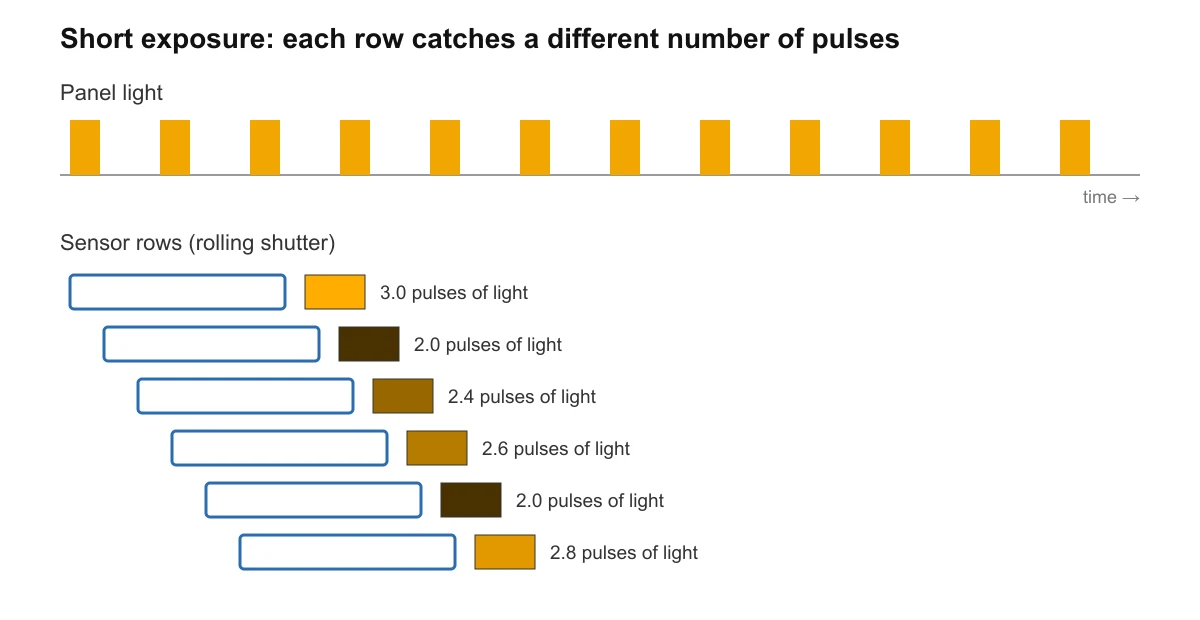
This is an illustration, not a measurement. It also explains the two things that make it worse:
- Bright scenes and outdoor light. The camera picks a short exposure, so each row sees fewer refresh cycles.
- Low panel brightness. The pulses get shorter and the gaps longer, so one pulse more or less makes a bigger difference.
The fix on the panel side is always the same idea: make the panel repeat its full image more times per second, so that even a short exposure catches many cycles.
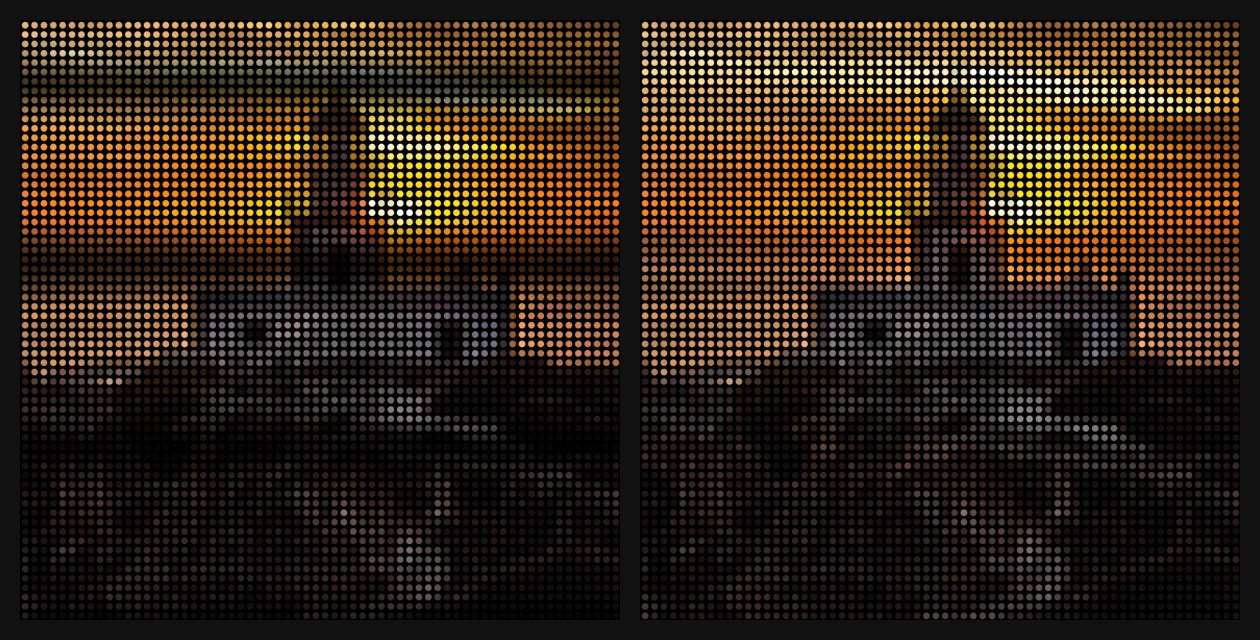
The image above is a simulation of what the bands look like, not a photo of my panel.
What refresh rate are you really running?
The refresh rate of a HUB75 panel depends on three things: the pixel clock (how fast data goes out to the panel), the colour depth (how many BCM slots each row needs), and how the library schedules those slots.
ESP32-HUB75-MatrixPanel-DMA calculates a refresh rate when it starts and stores it in calculated_refresh_rate. On the ESP32-S3 that number can be wrong, and it was in my case. Here's why.
On the S3, the library drives the panel with the LCD peripheral, whose clock is 160 MHz divided by a whole number. In the library source, if you ask for i2sspeed = HZ_20M, it picks a divider of 7, which gives 160 / 7 = 22.9 MHz, not 20. But the refresh rate calculation uses the 20 MHz you asked for. With version 3.0.14, my production settings (8 bits of colour, HZ_20M) printed 137 Hz, while the real clock gives about 157 Hz.
Two notes before you compare numbers with mine:
- All my numbers are for version 3.0.14. The current version (3.1.0 when I'm writing this) changed how the BCM passes are built and how the refresh rate is calculated, so the same settings will give you different hertz. Read the log of your own build.
- If the DMA buffer lives in PSRAM, the library limits the S3 clock (divider 12, about 13.3 MHz) so the memory can keep up. That alone lowers the refresh rate a lot.
The settings that matter
These are the knobs in ESP32-HUB75-MatrixPanel-DMA that change the refresh rate. The names are from the library's source.
i2sspeedinHUB75_I2S_CFG: the pixel clock you ask for (HZ_8M,HZ_10M,HZ_15M,HZ_16M,HZ_20M). On the S3 it's mapped to a divider of 160 MHz, as above.S3_LCD_DIV_NUM: a build flag that overrides that divider on the S3.-DS3_LCD_DIV_NUM=6gives 160 / 6 = 26.7 MHz. The divider is the fieldLCD_CAM.lcd_clock.lcd_clkm_div_num, which can also be written afterbegin(), handy for trying values without recompiling.PIXEL_COLOR_DEPTH_BITS(build flag) andsetPixelColorDepthBits()(in the config): the colour depth, 8 by default. Every bit you remove roughly halves the time each row needs, so the refresh rate goes up fast.min_refresh_rateinHUB75_I2S_CFG: the minimum refresh rate you want. If the library can't reach it with full BCM, it raiseslsbMsbTransitionBit: the lowest bits of colour stop getting their own short slots and are shown with equal time instead. That gains hertz, but the darkest shades lose precision, and version 3.0.14 warns in the log that perceived colour depth may be reduced. You don't setlsbMsbTransitionBitdirectly: it comes out ofmin_refresh_rate, and the library prints the value it chose in the log.
The colour depth trap
This is the one that cost me the most time, because it made a good idea look bad.
The library corrects brightness with a CIE 1931 lookup table, so that a value of 128 looks like half brightness to the eye. That table is chosen when the library is compiled, from PIXEL_COLOR_DEPTH_BITS, which is 8 if you don't set it. If you only call setPixelColorDepthBits(7) in your config and don't compile with -DPIXEL_COLOR_DEPTH_BITS=7, the library keeps the 8 bit table and feeds its values into 7 bit colour. Light colours overflow, and the image looks scrambled, with rainbow patches where there should be white or pale tones.
An earlier test I did with 6 bits looked terrible for exactly this reason, and I nearly discarded lower colour depth because of it. The test was broken, not the idea. I checked the source of 3.0.14 and of the current version, and in both the table is still picked from the build flag.
The fix: always set the build flag to the same depth you use at runtime.
What I tested, and what happened
All of this is on the same bench: 64x64 panel, 1/32 scan, Chipone ICN2037BP drivers, ESP32-S3, library 3.0.14, filmed and photographed with an iPhone.
| Settings | Refresh rate | Result on camera |
|---|---|---|
8 bits, HZ_20M (22.9 MHz real) |
about 157 Hz | Intermittent bands in phone video with my full firmware |
| 7 bits, lsbMsbTransitionBit 1, 26.7 MHz | 343 Hz | Clean in photos and video at brightness 255, 128, 64 and 40. Bands only when I lowered the exposure a lot by hand |
| 7 bits, lsbMsbTransitionBit 3 | 485 Hz | Worse on camera, and lines visible to the naked eye |
| 32 MHz clock (divider 5) | n/a | Colours broke: the signal can't keep up on my panel |
| 6 bits, built correctly | 620 Hz | Works, but colour loses sharpness |
| Exactly 100 Hz | 100 Hz | Worse, with flicker visible to the eye |
A few things surprised me:
- More hertz isn't always better. Raising lsbMsbTransitionBit to 3 gave the highest number with 7 bits, but it does that by making the OE pulses very short, and short pulses were worse both on camera and in person.
- Matching the mains frequency didn't help. Phones adjust exposure to avoid the flicker of 50 Hz and 60 Hz lights, so I tried a refresh of exactly 100 Hz to fall in line with that. It was worse, and the flicker was visible without a camera.
- There's a ceiling on the clock. At 32 MHz the colours melted. How far you can go depends on your wiring, your cables and your panel, so there's no universal number.
My configuration
This is what I ended up with for a single 64x64 panel on an ESP32-S3, in platformio.ini:
build_flags =
  -DPIXEL_COLOR_DEPTH_BITS=7
  -DS3_LCD_DIV_NUM=6
  -DPANEL_MIN_REFRESH=150
PANEL_MIN_REFRESH is my own name, not the library's: in my code it goes into min_refresh_rate. With 3.0.14's calculation, 7 bits and a minimum of 150 Hz at the nominal 20 MHz makes the library choose lsbMsbTransitionBit 1. Then the divider of 6 makes the real clock 26.7 MHz, which gives the 343 Hz in the table.
In the config, the colour depth and the refresh request go together:
HUB75_I2S_CFG mxconfig(64, 64, 1);
mxconfig.i2sspeed = HUB75_I2S_CFG::HZ_20M;
mxconfig.min_refresh_rate = PANEL_MIN_REFRESH;
mxconfig.setPixelColorDepthBits(7); // same value as -DPIXEL_COLOR_DEPTH_BITS
Before you copy it, two warnings. The 26.7 MHz clock is only about 17% below the 32 MHz that broke on my bench, which is not a huge margin. I still want to test it with the panel hot after hours on, and on two or three more panels, before I call it final. And if you're on version 3.1.0, check the log: the refresh rate for these settings won't be the same.
If you only need a clean video today
If you can't change the firmware, you can still help the camera:
- Use a longer exposure. The longer each row collects light, the more refresh cycles it averages. With my 343 Hz settings, bands only came back when I pulled the exposure down a lot by hand, so the reverse also holds: don't let the camera pick a very short shutter.
- Avoid filming in very bright light. Outdoors or next to a sunny window, the camera shortens the exposure.
- Turn the panel brightness up for the video. Longer pulses are more forgiving.
Where Frame fits
All of this came from one question: does Frame look as good on someone's phone as it does on their shelf? Frame is a frame with a 64x64 LED panel that lives in your home. The people you love open the free app (iPhone and Android, no subscription), take or choose a photo, and it shows up on your Frame, wherever they are. People film their panels to share them, so the bands had to go.
I'm building it on my own, and you can read the whole story here or see how Frame works. It launches on Kickstarter on February 1, 2027, so you can't buy it yet. If you're into 64x64 panels, I also wrote about converting a photo to 64x64 pixel art and about Tidbyt alternatives.
Summary
- HUB75 panels flicker on camera because they light a few rows at a time with pulses of light, and phones read the image one row at a time.
- Bands get worse with short exposures and low panel brightness.
- On an ESP32-S3, the refresh rate in the log can be wrong; work it out from the real clock (160 MHz divided by a whole number).
- The best result on my panel: 7 bits of colour, lsbMsbTransitionBit 1 and a 26.7 MHz clock, for 343 Hz.
- If you change colour depth, set
-DPIXEL_COLOR_DEPTH_BITSto match, or the colours break. - Test any faster clock on more than one panel and with the panel hot.
And if you'd like a 64x64 panel at home that lights up with photos from the people you love, without writing a line of firmware, leave your email below. People on the list get in 24 hours before everyone else, at the founder price.
Best,
Álvaro M.