
When you live far from your partner, a normal photo frame doesn't help much. It shows the same picture from the same trip for years. What you actually want is a frame they can fill from wherever they are, so you look up from the sofa and see what their day looked like.
That kind of frame exists, and there are more options than it seems. This guide explains the two main types, what to check before you buy one, and which one fits which couple.
One thing first, so you know where I stand. My name is Álvaro and I build Frame, one of the options in this guide. I'm biased, so I'll tell you plainly when another frame is the better choice. Every price and feature of other brands here comes from their own websites, checked on November 17, 2026. Prices are in US dollars because that's what their US sites show, and Black Friday is close, so they will move. Check again before you buy.
The short answer
- You want sharp, realistic photos on a nice screen, and you want it now: a WiFi photo frame with a shared app, like Aura, Nixplay or Skylight. They're in stock and they ship right away.
- Your partner isn't techy and wants to send photos by email: look at Skylight or Nixplay, which both accept photos sent by email.
- You never want to pay a subscription: Aura says you can add photos and videos from its app with no subscription. Check each brand's free plan carefully before buying.
- You'd like a small, warm object that shows their photos as pixel art, more like a little window than a screen: that's what I'm building Frame for. You can't buy it yet.
Two kinds of photo frame for a long distance relationship
1. WiFi photo frames with an app
These are the frames most people picture: a screen of around 10 inches that looks like a photo in a frame. They connect to your WiFi and you add photos from an app on your phone. The important part for a long distance couple is that you can invite other people, so your partner adds photos from their own phone, in their own city, and they appear on your frame.
The best known are Aura, Nixplay and Skylight. They show photos the way your phone does: realistic, in high resolution, and large enough to see from across the room.
2. Pixel frames
A pixel frame shows images on a grid of LEDs instead of a screen. Frame, the one I build, has a grid of 64x64 LEDs. A photo becomes pixel art: you recognize the face, the place and the colors, but it's not a sharp picture. It's closer to a lamp or a small piece of art than to a tablet on a shelf.
Most pixel displays you'll find online, like the Divoom Pixoo 64, are made to show pixel art, clocks and animations, not to receive photos from someone far away. I wrote about that difference in my guide to Pixoo 64 alternatives.
What to check before you buy
These are the five questions I'd ask about any frame for a long distance relationship, whichever brand you look at.
Can your partner send photos from far away, easily?
This is the whole point, so check it first. Look for:
- How they send. An app on their phone, an email address for the frame, or both. Email is easier for people who don't want another app.
- What they need. Some frames ask the sender to install the app and create an account. That's fine for most couples, but worth knowing if your partner hates new apps.
- How fast it arrives. For a couple, a photo that shows up the moment it's sent feels very different from an album that syncs later.
Is there a subscription, and what does the free plan really include?
This is where frames that look alike stop being alike. Some charge nothing after you buy the frame. Others keep the basics free and put storage, videos or extra features behind a yearly plan. Read the free plan line by line, and ask yourself whether you'll still be happy with it in two years.
Privacy: who can send, and where do the photos go?
These are intimate photos, so check:
- Who can send to the frame. Ideally only people you invite, and you can remove them later.
- Where the photos are stored. Most WiFi frames keep your photos on their cloud servers. That's how your partner's photos reach you, but it means a company stores them.
- What happens if you break up or stop using it. Can you delete everything easily, from the app?
Setup for someone who isn't techy
Long distance often means one of you sets up the frame for the other, or gives it as a gift. Check whether you can set it up before giving it, how it connects to WiFi, and whether the person at home needs to touch the app at all. All of these frames need a WiFi network and a plug to keep receiving new photos.
The photo format
A screen and a pixel frame are different objects. A 10 inch screen shows every detail of the photo. A pixel frame shows a softer, simpler version. Think about where it will live: a big sharp screen on a nightstand can feel like a second phone, while a pixel frame can feel more like a lamp. There's no right answer, just the one that fits your home.
WiFi photo frames compared
| Frame | How your partner sends photos | Price on the maker's site | Subscription |
|---|---|---|---|
| Aura | The free Aura app; you invite people to share to your frame | From $149 (Carver 10") to $299 (Walden 15"), more for the Astra and Aura Ink models | Aura says adding photos and videos from the app needs no subscription |
| Nixplay | Mobile app, web app or email | Prices not checked today | Free plan with 500 MB of storage and 1 shared album; paid plans from $19.99 a year |
| Skylight | The free Skylight app or email | Frame 10" $139.99; Frame 2 from $169.99 | Plus plan at $39 a year for extra features |
| Frame | The free Frame app (iPhone and Android) | Not on sale yet | None |
Aura
Aura is probably the best known name in WiFi photo frames. On its site, the range goes from the Carver 10" at $149 to the Walden 15" at $299, with the Carver Mat at $179, the Aspen 12" at $229, and more expensive models (Astra and Aura Ink) above that.
For a long distance couple, the key line on Aura's site is that you can "invite loved ones to share their favorite moments directly to each other's frames", and add photos and videos "from the app, with no subscription required". Aura also says uploads are free and unlimited and are stored on its cloud servers. Setup, in Aura's words, is to plug in the frame, download the free app and connect it to WiFi.
Best for: couples who want realistic photos, no monthly fee and a frame that looks good in any room.
Nixplay
Nixplay sells 10.1 inch and 15.6 inch touch screen frames. Photos can arrive from the mobile app, the web app or by email, which is handy if your partner prefers to send from a computer. I couldn't load Nixplay's frame prices today (its store blocked my visits), so check them on its site.
Pay attention to the plans. Nixplay's free plan includes 500 MB of photo storage, short video clips and 1 shared album. The Great Value plan is $19.99 a year (100 GB) and Nixplay Plus is $29.99 a year, with unlimited photo storage and longer videos. For a couple sending photos every day, 500 MB can fill up, so count on a paid plan sooner or later.
Best for: couples who like sending by email or from a computer, and don't mind a small yearly plan.
Skylight
Skylight is the frame people often recommend for parents and grandparents, because sending is simple. The 10 inch Frame is $139.99 on its site (1280x800 screen), and the Frame 2 goes from $169.99 to $199.99 with a sharper 1920x1200 screen. You send photos from the free Skylight app or by email, and on the Frame 2 page Skylight says one email can carry up to 100 photos.
Skylight has a paid plan, Plus, at $39 a year. Its page lists remote settings, albums and slideshow mirroring among the Plus features, and the Frame 2 FAQ says video and captions need Plus. The comparison table on the same page seems to say otherwise, so if videos matter to you, ask Skylight before buying.
Best for: a partner who isn't techy and would rather send an email than install an app.
Frame: a pixel frame made for this
I built Frame because I needed it. My job took me to Valencia, almost 1,000 km from my parents, my brother and my friends, and I wanted to feel them close without having to pull out my phone. It's the same feeling a long distance couple has: wanting the other person to be part of your day. You can read the whole story here.
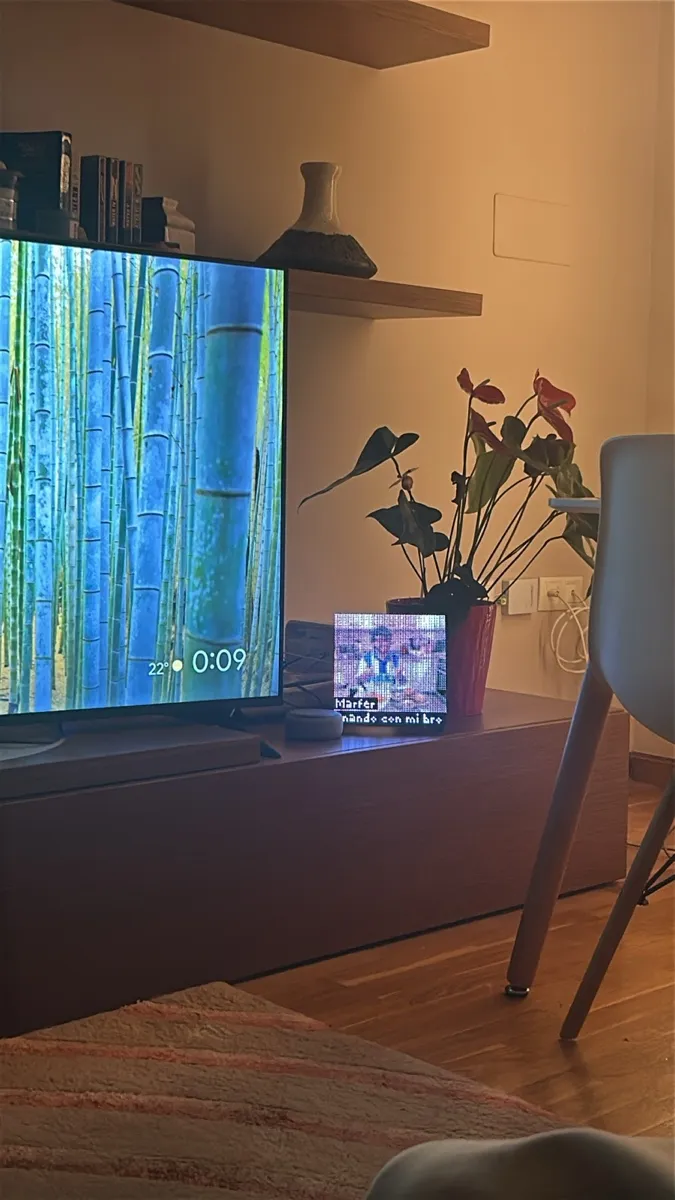
Frame is a frame with a 64x64 LED grid that sits in your home. Your partner opens the free app on their phone (iPhone and Android), takes or chooses a photo, and it shows up on your Frame as pixel art, wherever they are. They can also send drawings and short videos. There's no subscription, not for photos, not for anything.
Now the honest part, compared with the frames above:
- The photos are pixel art. 64x64 pixels, not a sharp screen. I love how it looks, warmer and more like an object than a phone, but if you want to see every detail of their face, an Aura or a Skylight will do that better.
- Sending is by app. Your partner sends from the Frame app, not by email.
- It's a small object, not a screen. That's the point for me: it lights up in the room without feeling like another device asking for your attention.
- You can't buy it yet. Frame launches on Kickstarter on February 1, 2027. It's one person in Valencia and a product with no years of reviews behind it, while the brands above have been selling frames for years.
Best for: couples who'd like a small window into each other's day, more like a lamp than a tablet, and who are happy to wait for it.
So which photo frame should you pick?
If you want realistic photos and you want a frame this year, pick one of the WiFi frames. Aura if you never want to pay a subscription, Skylight if your partner would rather send by email, Nixplay if you like its plans and sending from a computer. Before you buy, check the five things above, especially what the free plan includes.
If you'd rather have a small, warm object that lights up with their photos as pixel art, that's Frame. If that sounds like you, leave your email below. People on the list get a heads up 24 hours before launch, and whoever reserves gets it for 75 € ($85). And if you're comparing other ways to stay close, I also wrote about Lovebox alternatives, with bracelets and friendship lamps, and a list of minimalist gift ideas.
Best,
Álvaro M.